- There are no more items in your cart
- Shipping
- Total £0.00
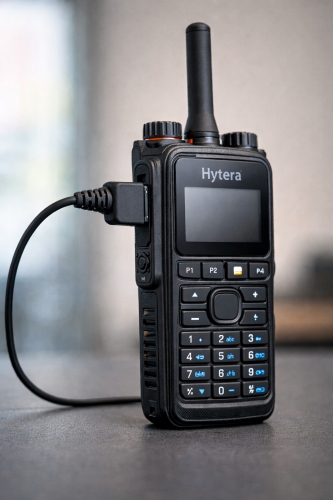
Investing in high-quality two-way radios is a smart move for any business, but the hardware—including the right Hytera earpiece—is only half the equation. To truly unlock the potential of your communication system, you need the right accessories. However, navigating the landscape of earpiece connectors can feel like trying to solve a complex puzzle without the picture on the box.
Hytera, a global leader in radio communications, manufactures a vast array of devices, ranging from compact, licence-free models to heavy-duty professional handsets. Consequently, they utilise several different connector types to suit the specific design and IP (Ingress Protection) rating of each radio.
Buying the wrong earpiece is a common and frustrating mistake. It leads to wasted budget, operational delays, and the hassle of returns. This guide cuts through the confusion, breaking down the specific connector types and compatible models so you can equip your team with confidence.
Understanding Hytera Connectors
Before looking at specific model numbers, it is helpful to understand why different connectors exist. Manufacturers do not change plugs just to be difficult; the design usually dictates the function.
For instance, a radio designed for a security guard in a calm retail environment might use a simple 2-pin plug because it is lightweight and easy to detach. Conversely, a radio built for a riot squad or an oil rig worker needs a multi-pin connector with a screw lock to ensure the earpiece never disconnects during a physical altercation or in wet conditions.
Hytera radios generally fall into three main connector categories:
- The 2-Pin Block (with screw): Common on mid-range and legacy analogue radios.
- The Multi-Pin: Found on higher-end digital DMR radios for better waterproofing and data capability.
- The Single Pin: Reserved for compact, pocket-sized radios.
Compatibility Guide by Radio Model
To make this as simple as possible, find your radio model series below to identify exactly which connector you need.
PD400, PD500, and TC Series (2-Pin)
This is one of the most common connections found on Hytera equipment. It features a standard 2-pin arrangement but distinguishes itself with a screw mechanism to secure the plug to the side of the radio.
Compatible Models:
- PD4 Series: PD405, PD415, PD485
- PD5 Series: PD505, PD505LF, PD565
- TC Series (Analogue): TC610, TC620, TC626, TC508, TC510, TC700, TC446S, POWER446
Technical Insight: This connector is technically known as the H4 plug. Interestingly, the electrical pin configuration is identical to the Motorola 2-pin plug (used on radios like the CP040). This means you can technically plug a Motorola 2-pin accessory into these Hytera radios. However, the M1 lacks the locking screw. While it will work for audio, it may be pulled out easily, so the dedicated H4 connector is always the superior choice for professional use.
PD600 and X1 Series (Slim Multi-Pin)
As radios became slimmer and more digital-focused, the bulky 2-pin block became obsolete for high-tier models. The PD600 series utilizes a proprietary multi-pin connector that snaps or screws flush against the chassis, maintaining the radio's slim profile.
Compatible Models:
- PD6 Series: PD605, PD665, PD685
- X Series: X1, X1E, X1P
- Z Series: Z1P
- HP Series (New): HP605, HP685, HP705, HP785
These connectors are specifically designed to support advanced features and often maintain the device's waterproof integrity.
PD7 Series (Large Multi-Pin)
The PD7 series represents the workhorse of the Hytera digital range. These radios are built for rugged environments, and the connector reflects that. It features a wide multi-pin block with a prominent screw lock located in the centre.
Compatible Models:
- PD7 Series: PD705, PD705G, PD785, PD785G
- PT Series: PT580H (TETRA)
- UL Series: UL913 (Intrinsically Safe / ATEX)
If you are working in hazardous environments or heavy industry, ensure your earpiece connector is specifically designed for the PD7 series to maintain a secure connection.
AP and BP Series
The AP (Analogue Professional) and BP (Business Professional) series are newer additions to the Hytera lineup. These devices use a specific connector designed to balance durability with the modern aesthetics of the radio body.
Compatible Models:
- AP Series: AP515, AP585
- BP Series: BP515, BP565
PD3 Series (Single Pin)
The PD3 series radios are ultra-compact, resembling a mobile phone more than a traditional walkie-talkie. Due to their small size, they cannot accommodate a large multi-pin block. Instead, they utilize a single TRRS (Tip-Ring-Ring-Sleeve) jack, similar to a headphone jack but wired for transmit and receive audio.
Compatible Models:
- PD3 Series: PD355, PD365, PD375
Connector Types in Detail
Choosing the right earpiece isn't just about fitting the plug into the hole; it is about understanding how that connection impacts your daily operations.
The 2-Pin Advantage
The 2-pin connector used on the PD505 and TC series is a robust choice for general duties. The screw-lock mechanism is a significant upgrade over standard push-in plugs. If a staff member catches the cable on a door handle, the screw prevents the radio from disconnecting or falling to the floor. As mentioned earlier, while M1 plugs fit, opting for the dedicated H4 plug with the screw is highly recommended for security and hospitality roles.
Multi-Pin Durability
Multi-pin connectors (PD6 and PD7 series) are superior for challenging weather conditions. The pins are often spring-loaded or gold-plated to prevent corrosion. Furthermore, the way these plugs attach usually compresses a rubber gasket against the radio body. This seal is vital if you are relying on the IP67 or IP68 rating of your radio; a loose audio cover or a cheap earpiece connector can compromise the waterproofing of the entire unit.
Single-Pin Convenience
The single-pin connector on the PD3 series is all about convenience and discretion. It is quick to plug in and remove, making it ideal for retail or office environments where staff might share radios but keep their own personal earpieces. However, because it lacks a locking screw, users should be mindful of cable management to prevent accidental disconnection.
Purchasing Guide: Getting it Right First Time
Now that you have identified your connector, here are a few final tips to ensure you make the right purchase.
1. Check the label under the battery
Do not guess your radio model based on how it looks. Many Hytera radios share the same outer casing but have different internal specs or model numbers. Remove the battery from the back of the unit and read the model number printed on the chassis label (e.g., "PD705G").
2. Covert vs. Overt
Once you know the connector, decide on the style.
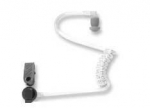
- Acoustic Tube (Covert): Best for door supervisors and security. It looks like a hearing aid and is discreet.
- D-Shape / C-Shape (Overt): Best for retail and hospitality. It sits on the outside of the ear and is easy to wipe clean between shifts.
3. Look for "Screw Lock" on 2-Pin descriptions
If buying for the PD4/PD5 series, specifically look for product descriptions that mention "Hytera Screw Lock" or "H4". If the description only says "2-pin" without mentioning the screw, you might end up with a loose-fitting Motorola style plug.
Summary
The effectiveness of your communication relies heavily on the link between the radio and your ear. While Hytera's range of connectors might seem daunting at first glance, they follow a logical structure based on the radio's size and intended use.
By verifying your exact model number—whether it is the compact PD355 or the rugged PD785—and matching it to the connector descriptions above, you can ensure crystal-clear audio for your team. A secure connection means safer operations, more professional interactions, and equipment that lasts longer.
(144) (0)
 Whatsapp